Private AI apps built around your own workflow.
JTech helps individuals turn personal app ideas into working software - from reminder apps and AI note systems to private assistants, study dashboards, document tools, and personal workflow apps.
Choose your starting point
Start with the version that fits your idea today. Your app can grow later once the first version becomes useful.
Personal App Prototype
Best for reminder apps, simple note tools, habit trackers, personal dashboards, basic task systems, and first-version app ideas.
Includes:- Focused first-version scope
- Simple app flow
- Core screens
- Basic database or storage where required
- Mobile-friendly web app build
- Launch guidance
Personal AI Assistant Build
Best for AI note-taking apps, private assistants, study assistants, document helpers, research tools, planning systems, and personal knowledge apps.
Includes:- Workflow mapping
- App design and build
- AI summaries, drafting, search, or planning features
- Private data structure
- User access setup where required
- Testing and launch support
Advanced Personal System
Best for personal operating systems, advanced knowledge bases, private workflow platforms, AI-powered productivity systems, and tools with multiple connected features.
Includes:- Detailed product scoping
- Multiple workflows or modules
- Advanced dashboard structure
- Document upload or AI search where required
- Automation planning
- Stronger privacy and access-control planning
Not sure which package fits? Send your idea and JTech will recommend the right starting point before quoting.
Choose your app type
Most personal AI apps start from one clear workflow problem. These are the most common starting points.
Reminder & Task App
For routines, appointments, bills, follow-ups, habits, personal admin, and daily planning.
- +One-off and repeat reminders
- +Priority tasks
- +Simple calendar views
- +Follow-up lists
- +Daily or weekly planning screens
- +Task notes and categories
AI Notes & Knowledge App
For capturing notes, summarising information, searching saved content, organising ideas, and building a private knowledge base.
- +AI note summaries
- +Searchable notes
- +Tags and categories
- +Document storage
- +Idea organisation
- +Question-and-answer over saved notes
Private AI Assistant
For asking questions about your notes, planning your week, drafting text, extracting tasks, and managing personal workflows.
- +AI planning support
- +Drafting help
- +Task extraction
- +Reminder suggestions
- +Personal dashboard
- +Private assistant chat interface
Study or Work Dashboard
For modules, assignments, deadlines, readings, client notes, project planning, research, and professional admin.
- +Course or project dashboard
- +Deadline tracker
- +Reading and resource manager
- +AI study summaries
- +Work notes
- +Progress planning without unnecessary tracking
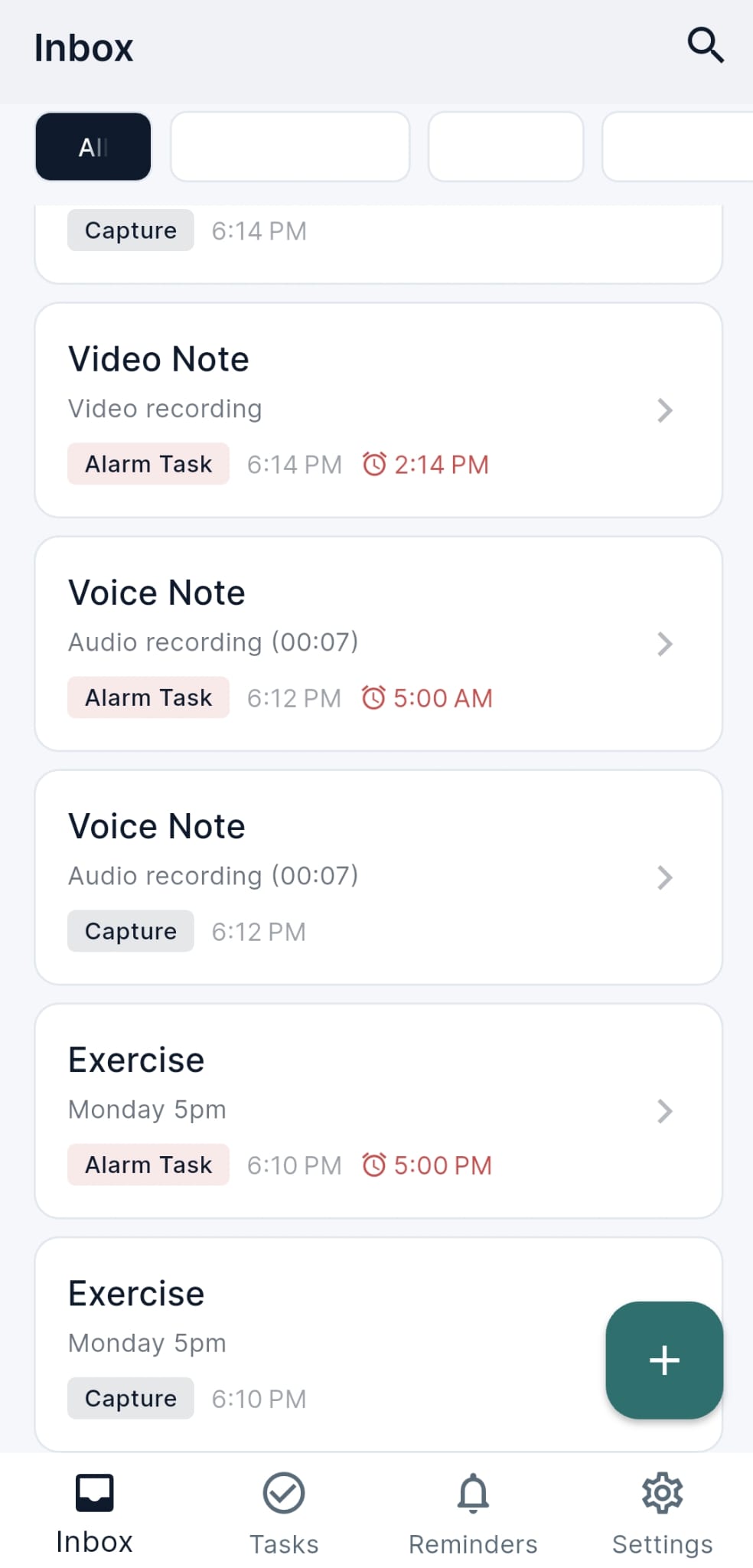
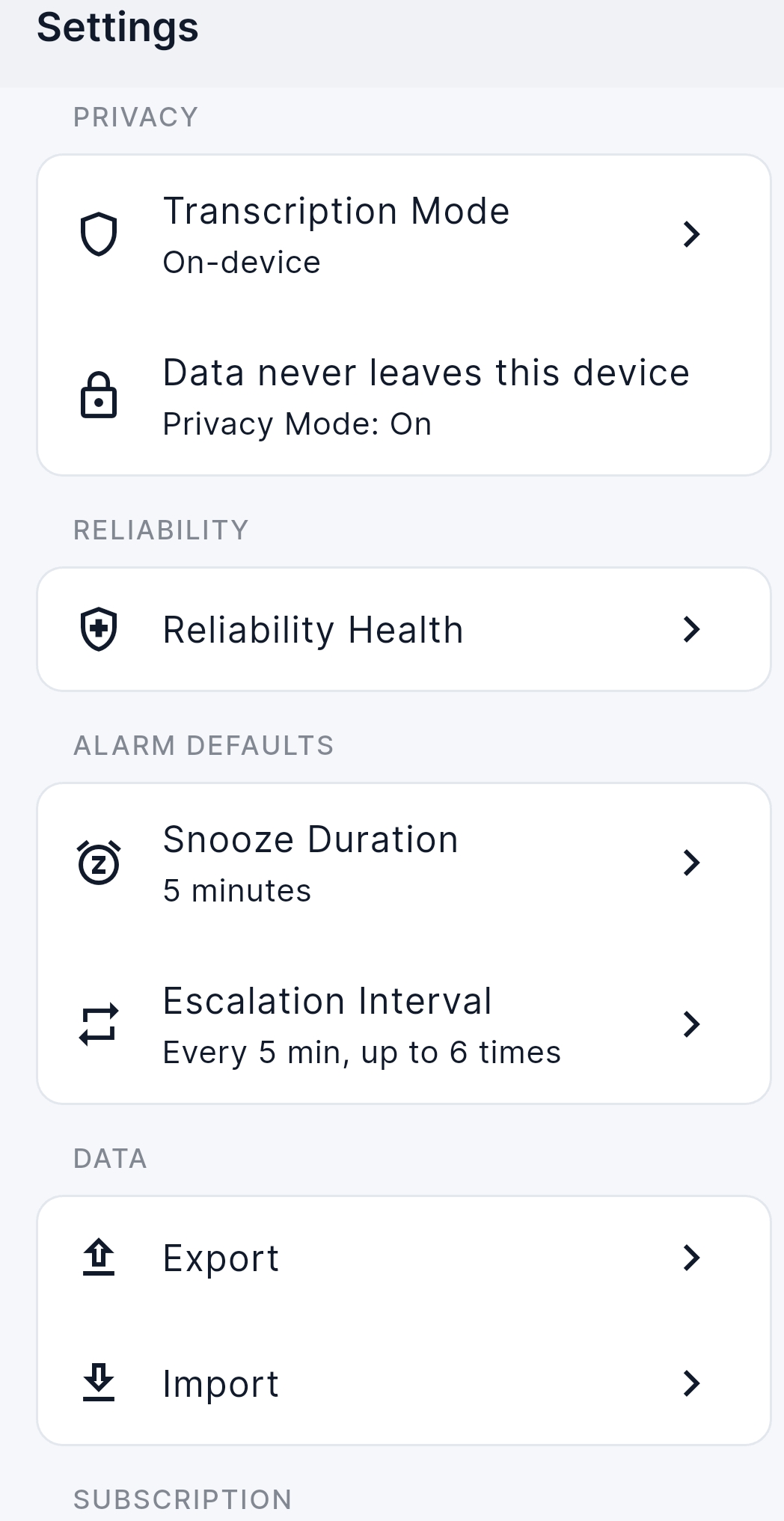
Minder: a real personal AI app built by JTech
Not a mockup. Minder is a privacy-first capture and alarm system for notes, tasks, reminders, voice recordings, and alarm-based task management. Built around the workflow: Capture, Convert, Remember.
 Live
Live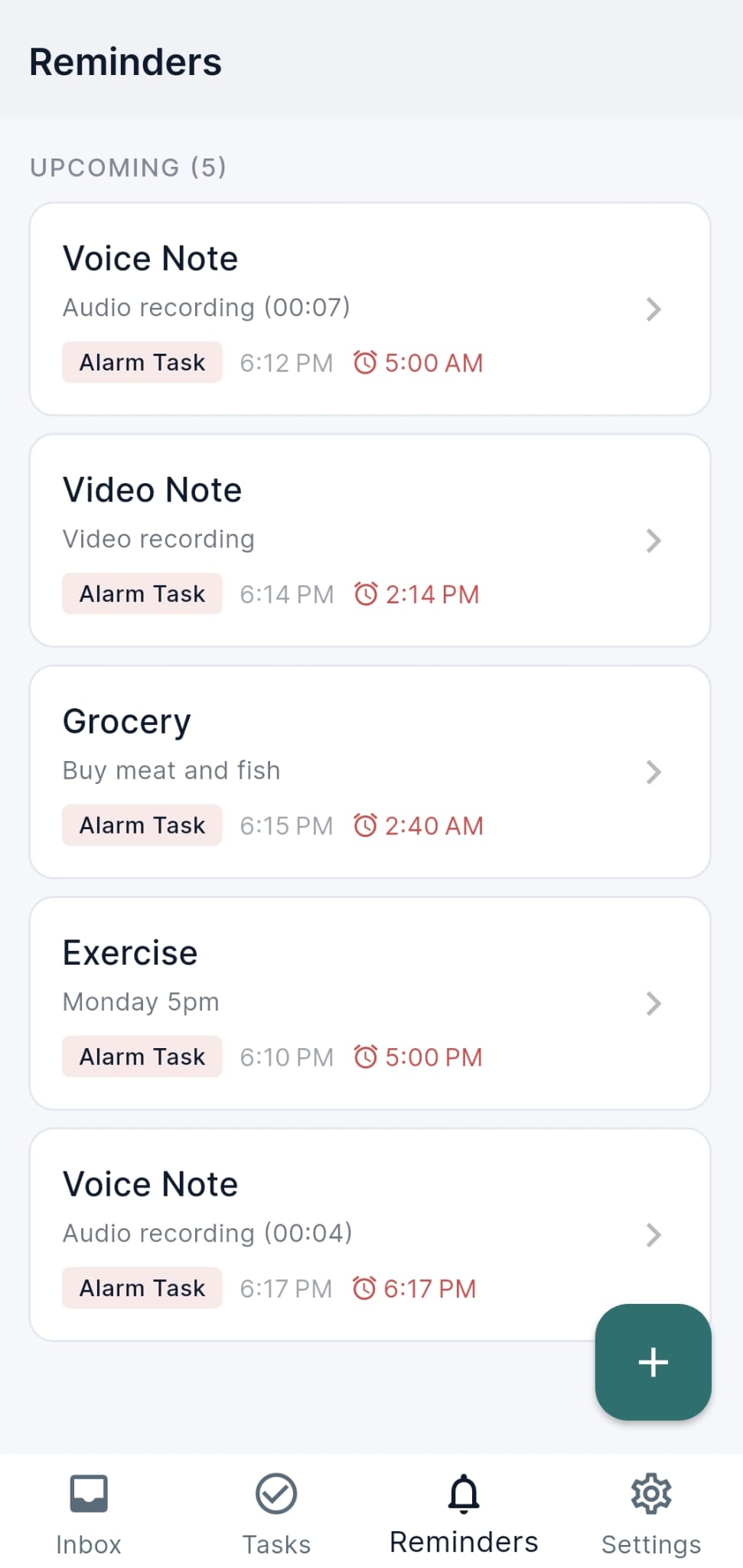
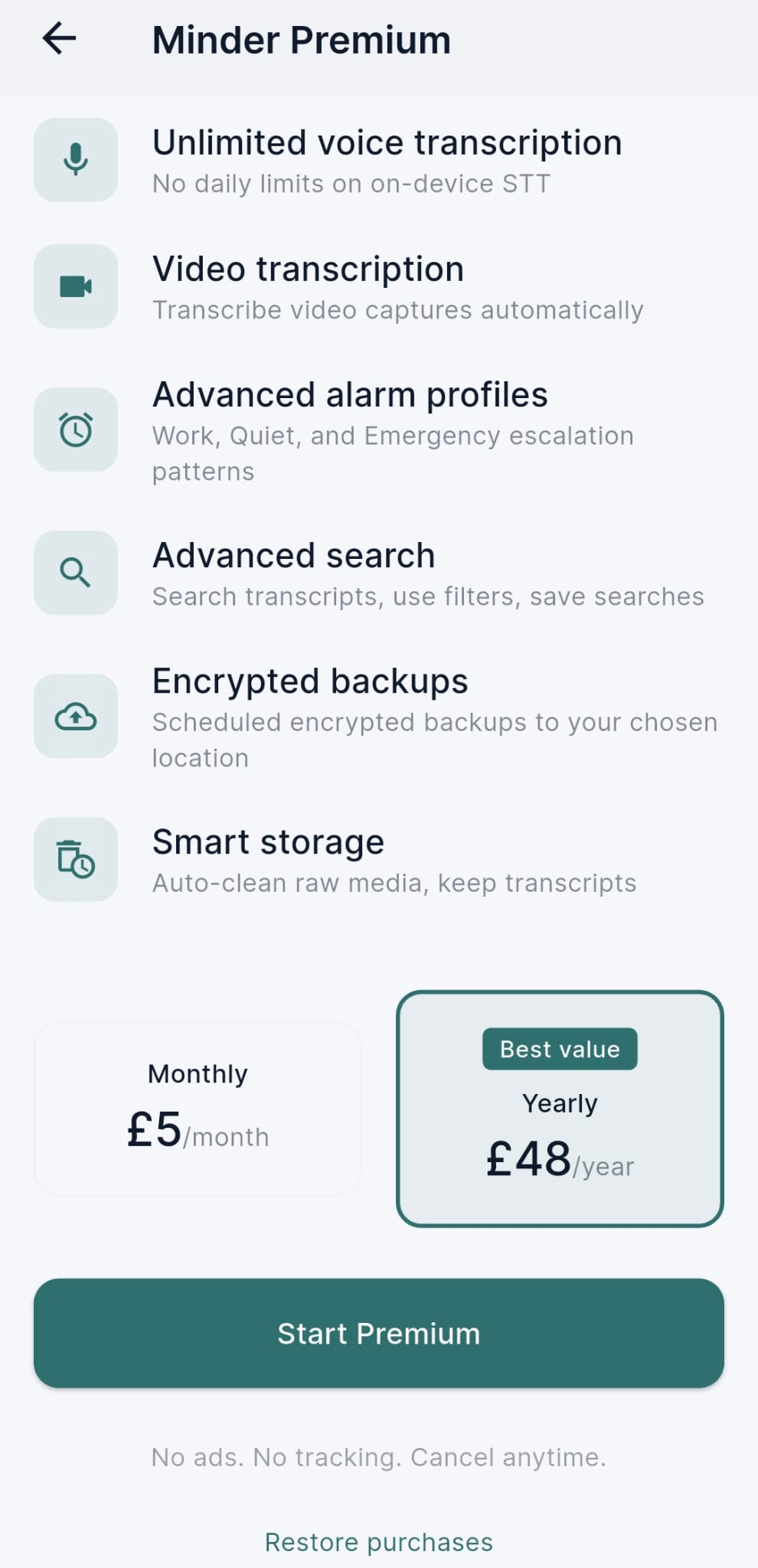
Fast multimodal capture
Text, voice, and video capture that converts into notes, tasks, reminders, or alarm-tasks in seconds.
Alarm-grade reliability
Snooze, escalation intervals, missed detection, and recovery. Important tasks never get lost in a notification tray.
Privacy-first by default
On-device transcription, data never leaves the device, no ads, no tracking, no cloud dependency. Privacy is the default, not a setting.
Why generic apps do not fit every workflow
Many people use several apps for notes, reminders, documents, tasks, and planning. The result is often scattered information and repeated manual work.
Your information is spread everywhere
Notes live in one app, reminders in another, documents somewhere else, and important decisions get lost in messages or screenshots.
Generic tools do not match your routine
Most productivity apps force you to work their way. A custom app can be shaped around the way you already think, study, plan, or work.
AI is useful, but not when it is disconnected
Chatbots are helpful, but they become more useful when connected to your notes, documents, tasks, and personal workflow.
Personal tools need better privacy boundaries
A personal app may contain private notes, plans, goals, documents, routines, and sensitive work information. It should not be designed like an engagement-tracking consumer app.
What your build can include
Each project is scoped around the first useful version. The exact features depend on your workflow, budget, and long-term goal.
Discovery and workflow mapping
We clarify the problem, daily workflow, app goal, must-have features, and first version scope before development starts.
Simple app design
A clean interface designed around the way you actually use the tool, with clear screens, simple navigation, and mobile-friendly layouts.
Core feature development
The first working version of your app, focused on the features that solve the main workflow problem.
Private database or storage
Structured storage for notes, reminders, tasks, documents, settings, categories, or app data where required.
AI feature setup
AI summaries, search, task extraction, document Q&A, drafting, planning support, or assistant-style responses where useful.
Private deployment guidance
Guidance on how the app can be deployed, accessed, maintained, and expanded safely after launch.
Start small. Build the useful version first.
A personal AI app does not need to start as a huge platform. The best first version usually solves one clear problem.
The first version should be small enough to build properly and useful enough to become part of your routine. Once it works, it can grow into a larger personal system.
A focused first version can help you:
- Remember important tasks
- Organise notes
- Search documents
- Plan study or work
- Track decisions
- Turn ideas into action
- Capture voice notes
- Manage personal admin
Example personal AI apps JTech can build
These examples show how a personal app idea can become a practical working tool.
Personal Reminder App
Routines, appointments, bills, follow-ups, habits, and daily planningA private reminder app can help you manage repeat tasks, important dates, daily routines, and follow-ups without relying on scattered notes or memory.
- One-off reminders
- Repeat reminders
- Priority levels
- Daily task view
- Weekly planning view
- Notes attached to reminders
- Status tracking
- Reminder categories
AI Note-Taking App
Students, founders, creators, researchers, and consultantsAn AI note-taking app can help you capture information, summarise long notes, organise ideas, search saved content, and turn notes into actions.
- Note capture
- AI summaries
- Tags and folders
- Searchable notes
- Action extraction
- Linked tasks
- Document upload
- Question-and-answer over saved notes
Personal AI Assistant
Private assistant connected to notes, tasks, and documentsA personal AI assistant can help with planning, drafting, summarising, task extraction, decision support, and private workflow organisation.
- Assistant chat interface
- Personal dashboard
- AI planning support
- Task extraction
- Drafting help
- Document Q&A
- Weekly summaries
- Saved context and categories
Study or Work Dashboard
Freelancers, students, and professionals managing research & deadlinesA study or work dashboard can bring deadlines, notes, documents, tasks, readings, and AI summaries into one private workspace.
- Module or project dashboard
- Deadline tracker
- Reading list
- Notes and summaries
- Task planning
- Document storage
- AI study support
- Progress overview
Optional upgrades
Start with the first useful version, then add more advanced features when the app proves useful.
User accounts and secure login
For private access, protected personal data, controlled usage, and account-based app features.
Document upload and AI search
Upload PDFs, notes, references, or saved documents, then ask questions, generate summaries, or search across your information.
Voice-to-note capture
Turn spoken ideas, reminders, meeting notes, or quick thoughts into organised notes, tasks, or summaries.
Calendar or reminder logic
Add repeat tasks, deadline reminders, planning views, follow-up dates, weekly reviews, and time-based workflows.
Mobile app wrapper
Turn the web app into a mobile-style app experience for easier phone access, depending on the project scope and platform requirements.
Admin dashboard
Manage notes, tasks, documents, reminders, categories, settings, prompts, and app content from a simple private dashboard.
Automation workflows
Connect notes, tasks, reminders, emails, forms, documents, or business processes so the app saves more manual effort.
Privacy-first deployment
Plan stronger control over storage, access, AI processing, and data boundaries for private or sensitive personal workflows.
AI prompt and assistant tuning
Shape how the assistant responds, what tone it uses, what tasks it performs, and what boundaries it follows.
Analytics without unnecessary tracking
Add simple usage insight where useful without turning the app into a behaviour-tracking product.
Personal use, founder use, or private business workflow
A personal AI app can be used for private productivity, study planning, founder idea management, personal admin, specialist work routines, client or project organisation, or early-stage product testing.
- Personal productivity
- Study planning
- Founder idea management
- Private notes and documents
- Personal admin
- Specialist work routines
- Client or project organisation
- Early-stage product testing
Building a commercial SaaS?
This is not a generic SaaS launch package. If you want to build a full public SaaS, customer-facing marketplace, or large MVP with multiple user roles, JTech can scope that separately.
Built for private workflows, not public exposure.
Personal apps can contain notes, documents, reminders, plans, goals, routines, and private thinking. They need careful boundaries.
JTech plans personal AI apps with privacy-aware architecture, controlled access, data minimisation, and clear storage boundaries. The goal is simple: make AI useful without turning your personal workflow into a tracking product.
Privacy principles:
- No unnecessary tracking
- Clear data storage boundaries
- Controlled access where required
- AI features scoped around useful tasks, not engagement manipulation
- Private workflow design before advanced automation
- Data minimisation wherever possible
How the build works
The process is designed to turn a rough app idea into a focused first version.
Share your idea
You explain the app you want, the problem it solves, and how you currently manage the workflow.
Map the workflow
JTech maps your tasks, notes, documents, reminders, routines, decision points, and pain points.
Scope the first version
We decide what should be built first and what should wait, so the project stays focused and realistic.
Design the app flow
We create a simple, mobile-friendly user flow before development so the app is easy to understand and use.
Build and test
JTech builds the working app, tests the key features, and prepares it for private use.
Improve later
Once the app is useful, we can add AI features, automation, integrations, search, or dashboards.
Personal AI app starting prices
Every project receives a fixed written scope before development starts. Final pricing depends on features, AI requirements, data storage, design complexity, and deployment needs.
Personal App Prototype
Best for reminder apps, simple note tools, habit trackers, personal dashboards, basic task systems, and first-version app ideas.
Typical Scope:- Focused first-version scope
- Simple app flow
- Core screens
- Basic database or storage where required
- Mobile-friendly web app build
- Launch guidance
Personal AI Assistant Build
Best for AI note-taking apps, private assistants, study assistants, document helpers, research tools, planning systems, and personal knowledge apps.
Typical Scope:- Workflow mapping
- App design and build
- AI summaries, drafting, search, or planning features
- Private data structure
- User access setup where required
- Testing and launch support
Advanced Personal System
Best for personal operating systems, advanced knowledge bases, private workflow platforms, AI-powered productivity systems, and tools with multiple connected features.
Typical Scope:- Detailed product scoping
- Multiple workflows or modules
- Advanced dashboard structure
- Document upload or AI search where required
- Automation planning
- Stronger privacy and access-control planning
The best starting point is usually the smallest version that solves the main workflow problem. Advanced AI features can be added once the first version is useful.
Why JTech can build this
JTech is already building and shipping privacy-first software systems, AI workflow tools, and custom digital platforms.
Minder
A privacy-first, offline-first personal capture and alarm system for notes, tasks, reminders, voice recordings, and alarm-based task management. Runs on web and mobile.
MumGuardian
A privacy-first education platform for families and schools, designed around online safety, child-safe learning, and responsible digital experiences.
GenMus
A structured AI workflow platform that turns a single prompt into researched knowledge, plain-English explanation, and organized structure, live at genmus.co.
Dent Hub
A specialist digital platform based on real dental industry workflow experience.
Why this experience matters: Personal AI apps are not only about code. They require workflow understanding, privacy-aware planning, simple UX, useful AI features, and realistic first-version scoping.
This service is not suitable for every idea
The best projects start with one clear workflow problem. Some ideas need a different type of project scope.
For best results, start with one clear workflow problem and build the smallest useful version first.
This may not be the right fit if you need:
- A complex public SaaS platform with many customer roles.
- A large enterprise system.
- A regulated medical, legal, or financial decision-making app.
- A low-cost clone of an existing commercial app.
- An app with unclear purpose and no defined workflow problem.
- A public product launch without proper MVP planning.
Personal AI App Builder FAQ
Common questions about building a private AI-powered app with JTech.
Privacy-first digital safety education for families and schools. GDPR & COPPA aligned, no tracking, no ads.
mumguardian.comDigital platform for a precision implant dentistry lab, built on 15+ years of dental technology experience.
denthublab.comDeterministic, step-based AI pipeline that turns vague input into structured, high-quality output.
genmus.coPlus HOLO, Minder, Oryno and more live and in build - see all work & case studies
Have a personal app idea?
Send your idea, workflow problem, or rough concept. JTech will help turn it into a clear first-version scope with a fixed written quote before development starts.