
JTech LogoJTech

WINDOWS RESOURCE PROTECTION

Stop runaway apps before they freeze your Windows PC.

JTech Guard watches CPU, memory, disk, network, and process behaviour, warns when an application is pushing your system toward an unusable state, and gives you clear controls to restrict, recover, and review what happened.

7-day full trialNo card requiredOne-time licenceLocal-first monitoring

Windows 10/11 · No card required · £49 lifetime licence · Privacy-first

Signed Windows installer. Clear version history. Direct JTech support.

Already purchased? Activate your licence
Healthy - Your PC is running normally
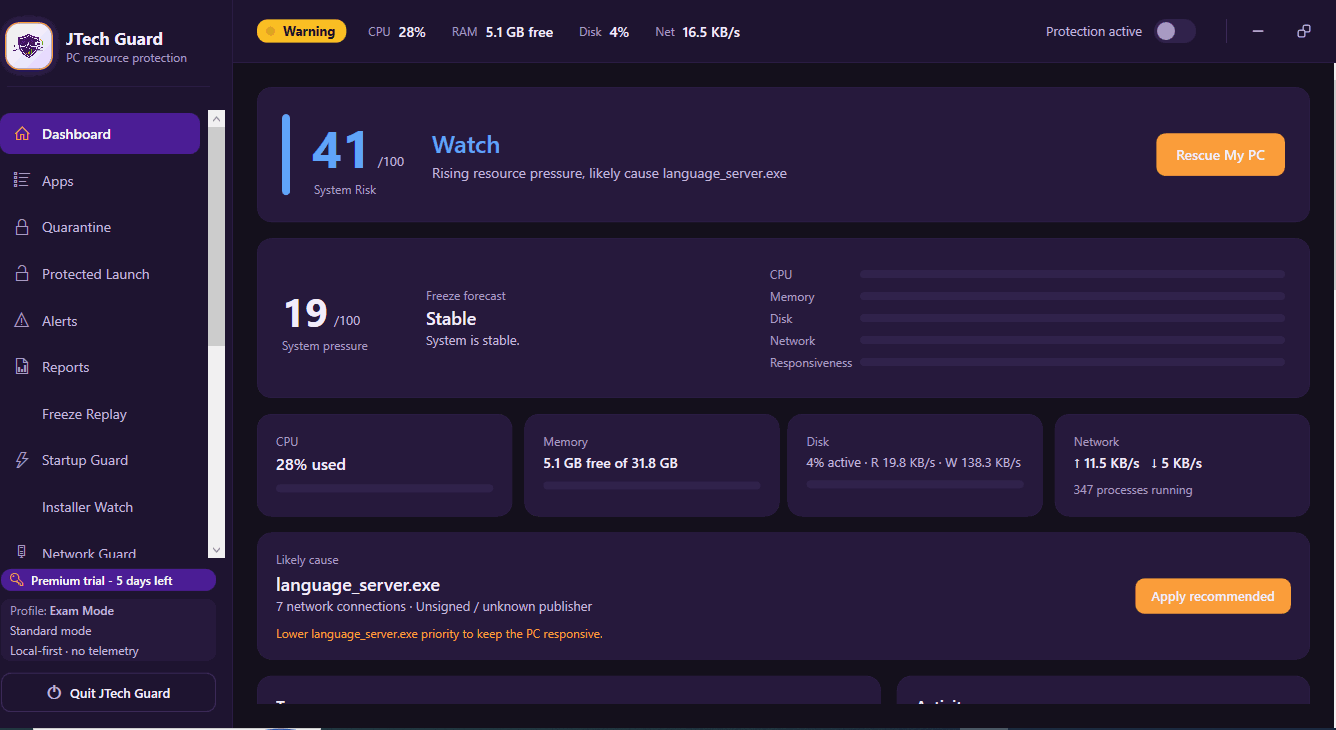
JTech Guard dashboard showing CPU 7%, RAM 15.4 GB free, Disk 0%, Net 748 B/s in healthy state
CPU7%
RAM15.4 GB free
Disk0%
Net748 B/s

THE PROBLEM

One app can make the whole machine unusable.

A browser tab leaks memory. A local AI model consumes every available resource. A renderer, installer, development tool, or background process stops responding.

By the time Windows feels frozen, Task Manager may be slow to open and unsaved work is already at risk.

JTech Guard is built for the moment before total lock-up - and for the recovery actions immediately after it.

You notice too late

The system often feels normal until resource pressure reaches the point where the interface can no longer respond properly.

You have to guess

Without clear process evidence, it is difficult to identify which application, background task, or resource pattern caused the slowdown.

Restart becomes the default

A forced restart may restore the PC, but it can interrupt work and erase the evidence needed to prevent the same incident.

Move from reacting after the freeze to acting before it.

Without JTech Guard
With JTech Guard
You notice the PC is struggling only after the interface becomes unresponsive.
You receive a clear warning while the system can still respond.
You guess which process is responsible.
The responsible application and resource pattern are identified.
You force a restart and lose context or work.
You can restrict or stop the problem process while preserving the rest of the session.
The incident disappears with no explanation.
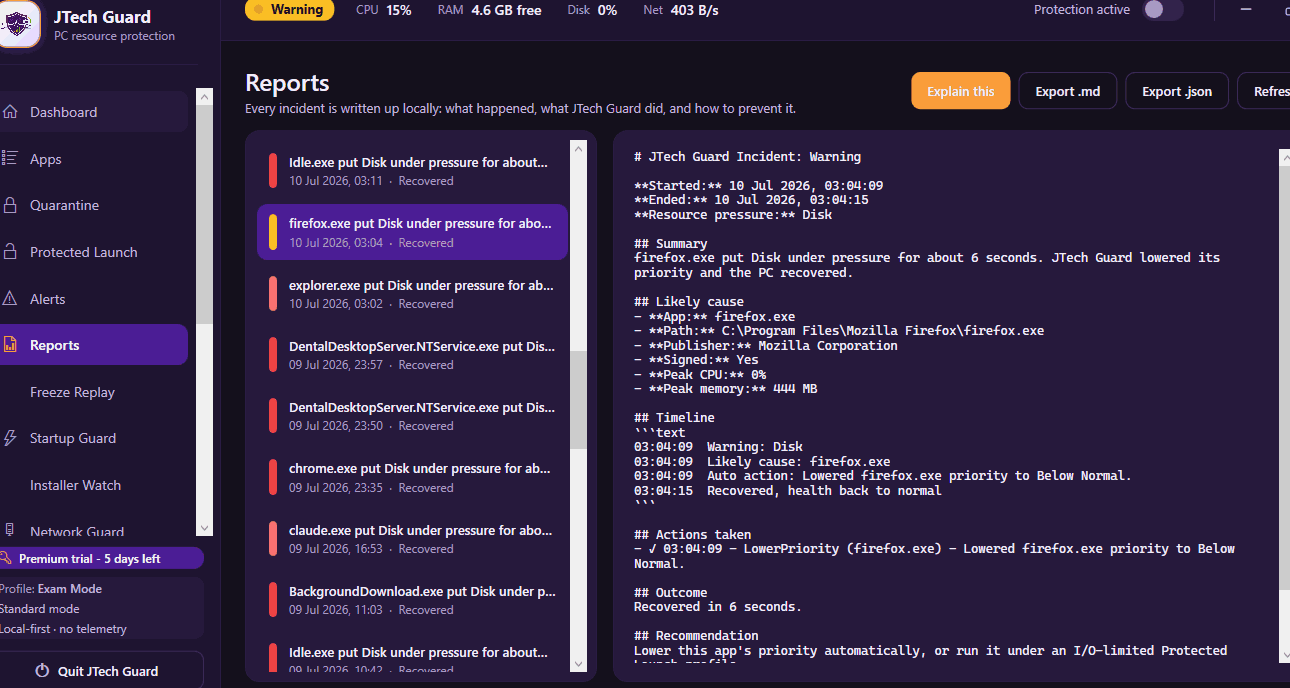
A report records what happened, which action was taken, and whether the system recovered.

HOW IT WORKS

Monitor → Alert → Restrict → Recover → Report

JTech Guard turns resource pressure into a controlled workflow. It watches for the warning signs, explains the risk, provides clear response options, and records the outcome.

01

Monitor

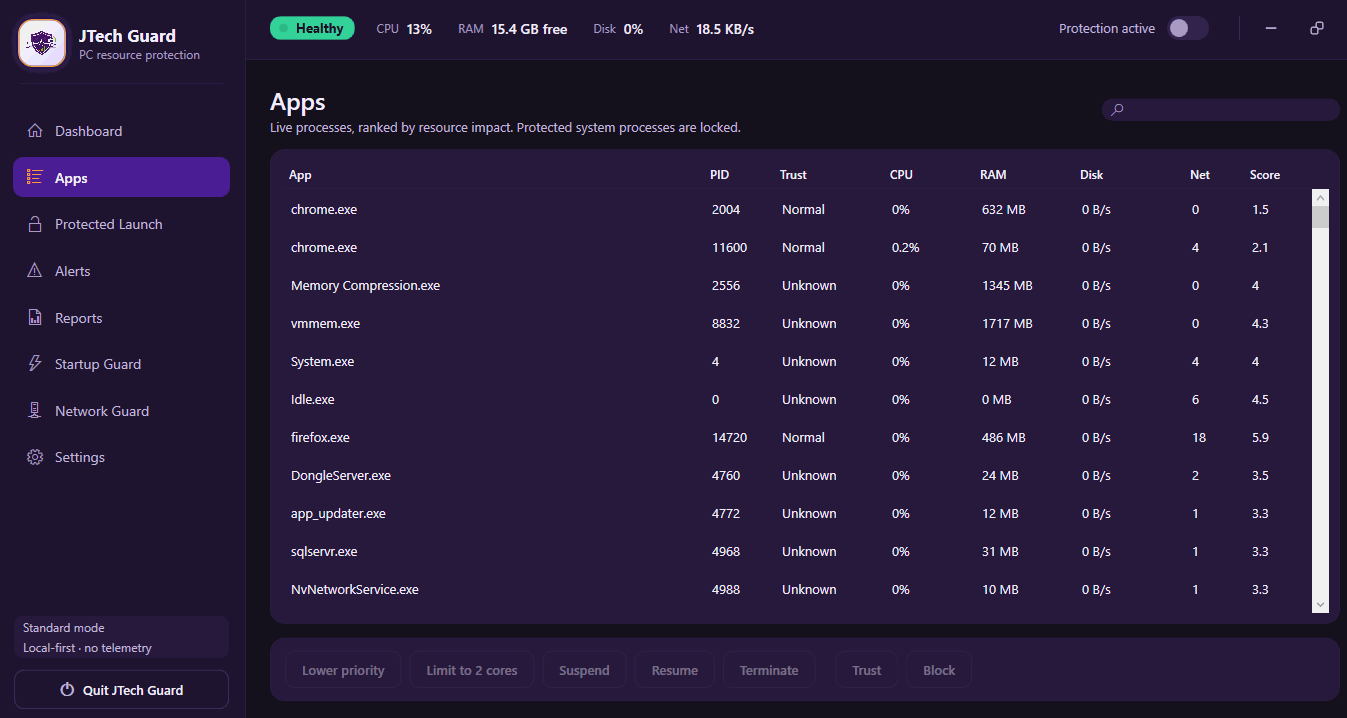
JTech Guard watches the resource signals that normally appear before a PC becomes unusable: sustained CPU load, memory pressure, disk saturation, network activity, and process responsiveness.

JTech Guard Apps screen showing live processes ranked by resource impact with CPU, RAM, Disk, Net columns
02

Alert

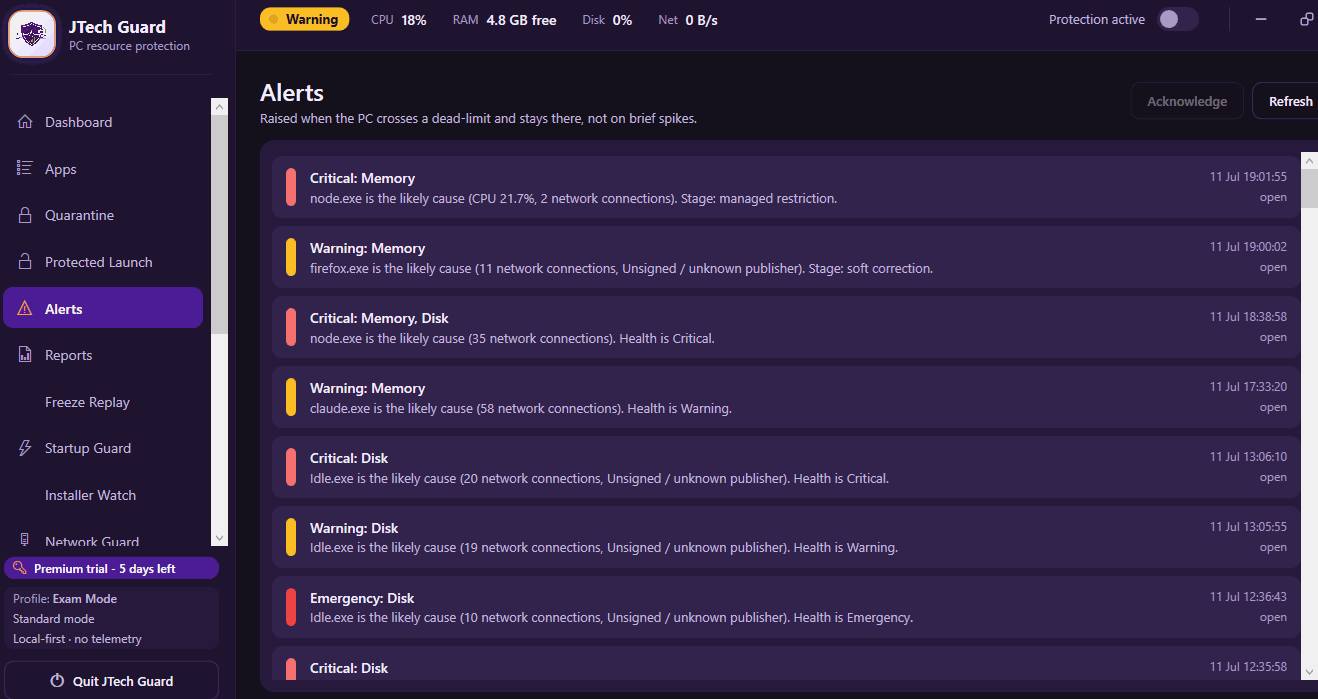
Warnings explain which application is causing pressure, which signal crossed the safe range, and how urgent the situation is.

JTech Guard alert notification explaining which resource limits were crossed
03

Restrict

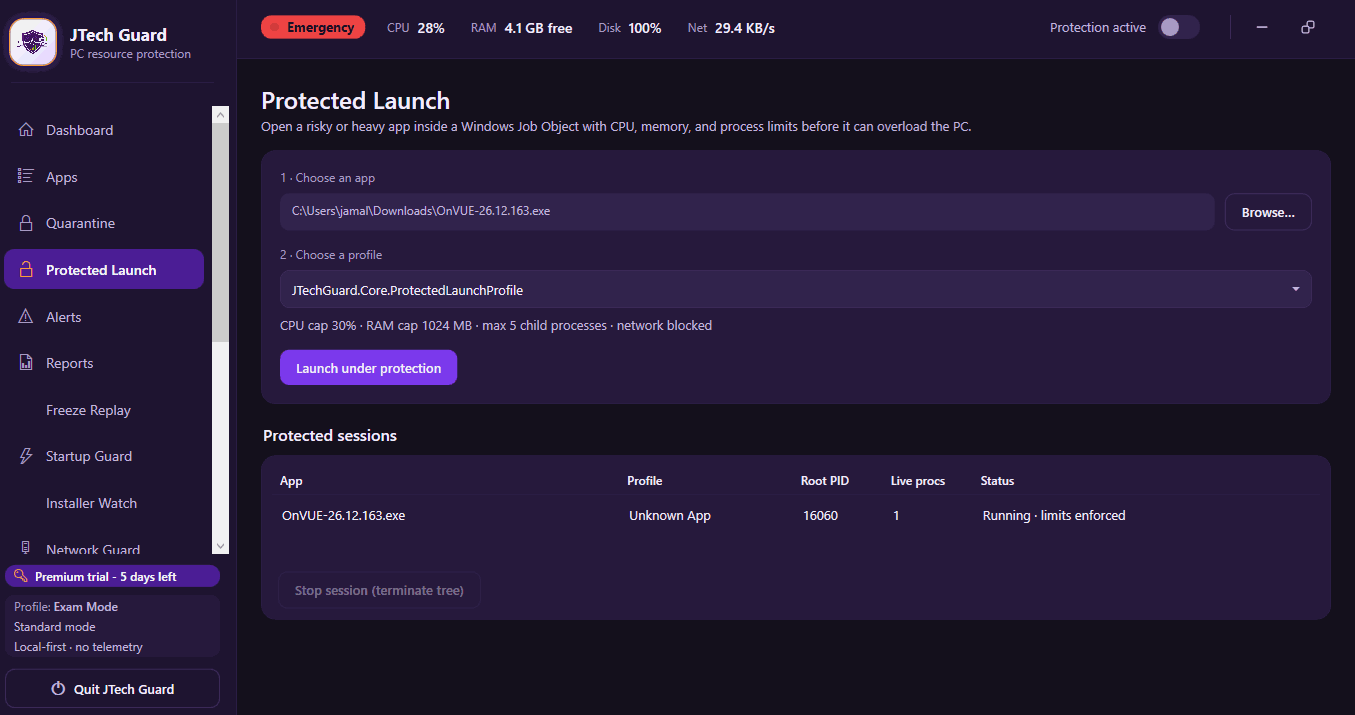
Apply a controlled response - such as lowering priority, suspending a process, or applying a configured limit - before the application overwhelms the machine.

JTech Guard Protected Launch screen showing CPU and memory caps before launching a heavy application
04

Recover

One-Click PC Rescue Mode focuses on restoring a responsive desktop quickly, without turning a full restart into the default answer. Recovery results depend on the application, Windows state, and resource condition.

05

Report

Review an incident timeline showing the application, resource pattern, warning, action, and recovery result. Use the evidence to tune future rules and understand recurring behaviour.

JTech Guard incident report timeline showing resource usage history and resolution details

PRODUCT DEMO

See JTech Guard recover a struggling PC.

Watch a controlled demonstration of JTech Guard detecting resource pressure, identifying the responsible application, applying a recovery action, and recording the result.

Click to watch demonstration

Try the same workflow on your Windows PC - free for 7 days.

Download Free Trial

ADAPTIVE PROTECTION MODES

Protection that adapts to what you are doing

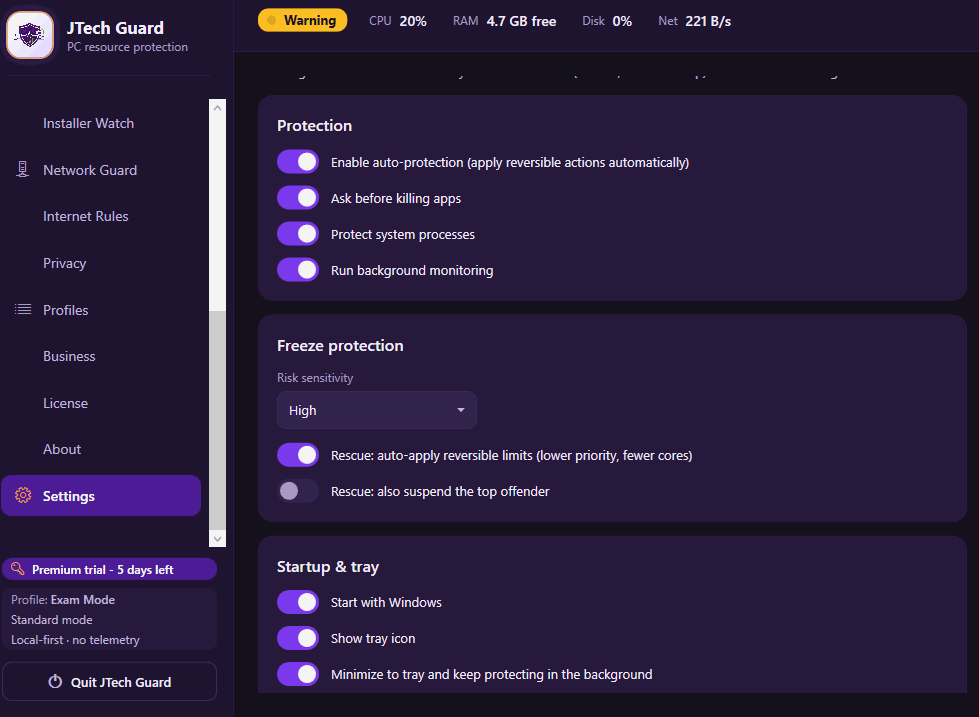
Choose a mode for everyday use, focused work, gaming, development, exams, privacy monitoring, or unfamiliar applications. JTech Guard adjusts how closely it watches system pressure and when it is allowed to take action.

Normal Protection Selected

Sensitivity: Balanced · Automatic restriction: Disabled

Best for: General daily PC use.

Every mode remains visible and reversible. You decide how aggressively JTech Guard responds, which applications are protected, and whether automatic restriction is allowed.

PREVENTION

See pressure building before the desktop becomes unusable.

Live Resource Monitor

View CPU, memory, disk, network, and process health in one operational dashboard.

JTech Guard Apps view showing all processes with CPU, RAM, Disk and Net columns

Protected Launch Mode

Open demanding applications inside a defined resource policy instead of waiting for a problem to appear.

JTech Guard Protected Launch mode with CPU cap 30%, RAM cap 1024 MB settings

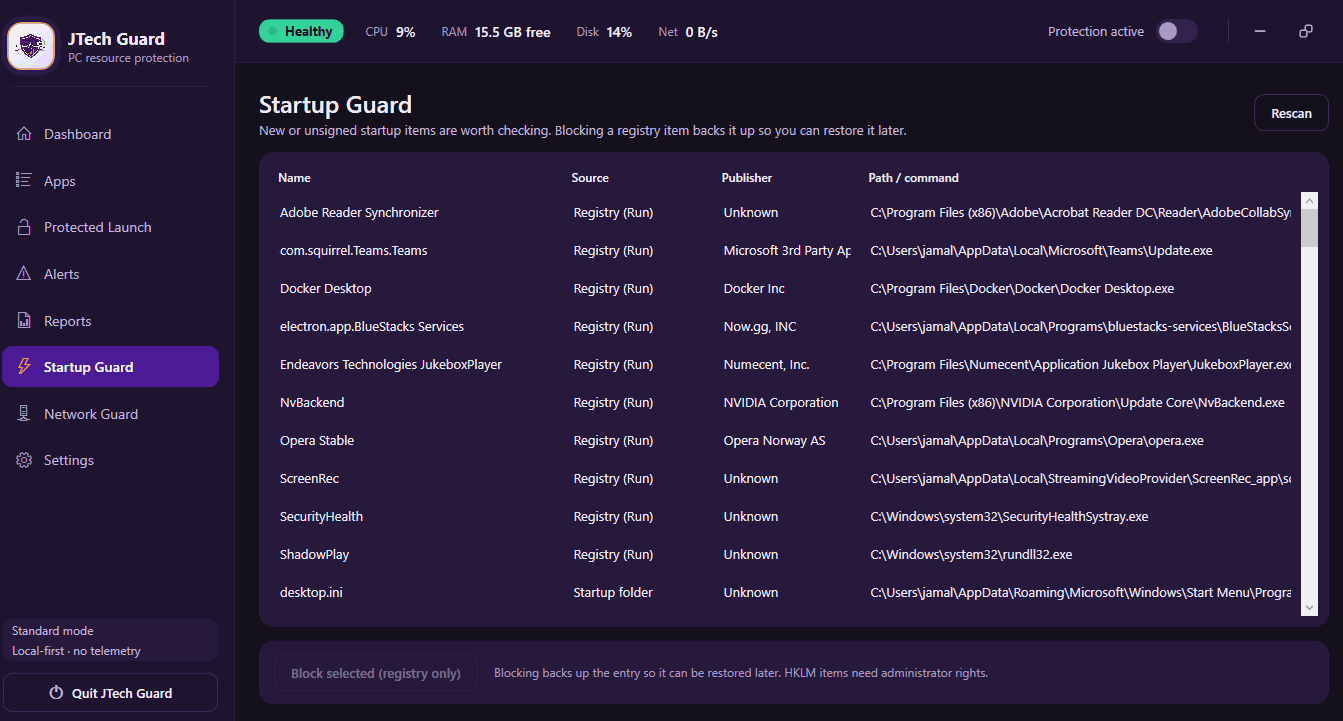
Startup Guard

Identify and control applications that create heavy system load immediately after Windows sign-in.

JTech Guard Startup Guard listing startup applications with their source and publisher

RECOVERY

Use clear actions when the PC begins struggling.

One-Click PC Rescue Mode

Start a controlled recovery sequence designed to reduce immediate pressure and restore a responsive desktop.

Clear Action Choices

Understand the difference between lowering priority, suspending, restricting, and ending a process before applying an action.

Application Rules

Save trusted limits and preferred responses for recurring workloads.

Recovery Status

See whether resource pressure is falling, whether the desktop is responding, and whether further action may be required.

Any action that may terminate an application or cause loss of unsaved work will display a clear warning, name the affected process, explain the consequence, and require confirmation before proceeding.

REPORTING

Keep the evidence instead of losing it after a restart.

App Behaviour Reports

Review patterns over time instead of treating every slowdown as an isolated event.

Incident Timeline

Record the warning, process, resource signal, action, and recovery outcome in one structured timeline.

Network Trust Map

See which applications are generating network activity and whether that behaviour matches your configured expectations.

Network Trust Map provides activity visibility and policy support. It is not malware detection, packet inspection, or a replacement for a firewall.

Exportable Support Evidence

Create a privacy-filtered report for troubleshooting or JTech support. Preview and approve before anything leaves your device.

BUILT FOR DEMANDING WINDOWS WORKFLOWS

Built for demanding Windows workloads

Developer

Scenario

An emulator, container stack, IDE, local database, and browser compete for memory during a build.

Outcome

JTech Guard identifies the accelerating process and applies the user's selected rule before the desktop becomes unusable.

Local AI User

Scenario

A model load, local inference task, or data workflow consumes memory and compute unexpectedly.

Outcome

The user receives a risk warning and can take action without immediately restarting the PC.

Creator / CAD User

Scenario

A render, export, or large project creates sustained CPU, memory, and disk pressure.

Outcome

The demanding workload remains visible while JTech Guard provides a controlled recovery path for the rest of the system.

Small Business

Scenario

A customer-facing workstation begins freezing during a call, invoice, meeting, or live task.

Outcome

Rescue Mode helps restore control, while the incident report supports prevention of the same problem later.

Power User / IT Support

Scenario

A user reports intermittent freezes but has no useful evidence after restarting.

Outcome

Behaviour history provides a practical starting point for diagnosis and policy tuning.

CLEAR PRODUCT BOUNDARY

Resource protection - not another antivirus.

JTech Guard works alongside Windows security tools. Its job is to protect responsiveness, expose resource behaviour, and provide recovery controls.

It does not claim to scan files for malware, block phishing, replace a firewall, or provide endpoint detection and response.

Antivirus or anti-malware
Endpoint detection and response
Firewall or packet inspection
Phishing or spam protection
A guarantee that the PC will never freeze
Recovery of unsaved work in other applications

Use JTech Guard for resource pressure and recovery. Continue using your normal Windows security protections for malware, phishing, firewall, and account security.

PRIVACY-FIRST BY DESIGN

Your system data should stay under your control.

JTech Guard is designed to perform resource monitoring and incident analysis locally by default. Purchase and licence services receive only the minimum information required to provide and validate the product.

Local Monitoring

Resource monitoring and incident history are processed and stored locally by default.

No Advertising Profile

No advertising SDKs, behavioural advertising profiles, or sale of device activity data.

Explicit Diagnostics Consent

Optional support diagnostics are sent only after the user previews and approves the information.

Minimal Licence Data

The licence service receives only the minimum data required for entitlement and activation.

Clear Controls

Users can review retention settings, delete local history, and export selected diagnostic information.

JTech Guard Settings screen showing Privacy section with Store reports locally only toggle enabled
Local-first · No telemetry by default

PRICING AND EDITIONS

Start free. Upgrade when you need more control.

Every JTech Guard installation starts with 7 days of full Premium access. No payment card is required. After the trial, continue with the Free edition, choose Pro for annual protection, buy Premium once, or request a multi-PC Business plan.

Try Premium free for 7 days

Every download includes full Premium access for seven days. No card is required. When the trial ends, continue with Free or activate a paid licence.

Download JTech GuardWindows 10 and Windows 11

Free

£0No subscription

Essential visibility and manual recovery tools for one Windows PC.

  • Live dashboard and System Pressure Score
  • Resource alerts and top-offender detection
  • Manual process controls
  • Change priority, affinity, or cores
  • Suspend or terminate applications
  • Recent incident reports
  • 7-day Premium trial on activation

Continue with Free after the Premium trial ends.

Download Free

Pro

£29Per year · One Windows PC

Automatic protection and controlled recovery for everyday Windows use.

  • Includes all Free features, plus:
  • Automatic protection & restriction rules
  • Protected Launch mode caps
  • Startup Guard manager
  • Network Guard activity tracking
  • App Quarantine Library & Safe Profiles
  • Annual compatibility & feature updates
  • Standard JTech support

Renews annually until cancelled. Cancel anytime.

Choose Pro - £29/year

Premium

£49One-time · One Windows PC

The complete JTech Guard feature set with a lifetime licence for the purchased major version.

  • Includes all Pro features, plus:
  • Network Trust Map & per-app internet rules
  • Privacy Mode & Freeze Replay Timeline
  • Local AI explanations & Installer Watch
  • Advanced incident analysis
  • Complete local behaviour history
  • Premium reporting features
  • Direct JTech support

Use the purchased major version indefinitely. Maintenance updates included.

Buy Premium - £49

Business

Contact usMultiple Windows PCs

Flexible licensing and deployment support for teams, support providers, and business workstations.

  • Multiple-PC licensing & volume pricing
  • Flexible Pro or Premium feature selection
  • Assisted licence setup & deployment guidance
  • Technician report export utility
  • Central support contact & billing invoices
  • Technician onboarding guidance call

Pricing depends on devices and deployment requirements.

Contact Business Sales

"Lifetime" means indefinite use of the purchased major version on one licensed Windows PC. Maintenance and compatibility updates for that major version are included. Future major versions may require a separate upgrade. Read licence terms.

No card for the trial
One-PC licences
Secure Stripe checkout
Activation key delivered by email
Offline activation available
Direct JTech support
Questions about editions, device transfers, or business licensing? Contact JTech before purchasing.

Know what you are downloading.

JTech Guard releases are versioned, signed, scanned, and published with verification information so you can confirm the installer before opening it.

ProductJTech Guard
Versionv1.0
Release date2026
PlatformWindows 10 and Windows 11 (64-bit)
Architecture64-bit Windows
FormatMSIX / EXE
PublisherJTech

Frequently asked questions

More questions? Visit JTech Guard support

Ready to keep your PC responsive?

Download JTech Guard and use every core protection and recovery feature free for 7 days. No card required.

Current version v1.0

Test it on your own PC before you buy.